
Java String format()
In this tutorial, we will learn about the Java String format() method with the help of examples.
The format() method returns a formatted string based on the argument passed.
Example
class Main {
  public static void main(String[] args) {

    String str = "Java";

    // format string
    String formatStr = String.format("Language: %s", str);

    System.out.println(formatStr);
  }
}

// Output: Language: Java
format() Syntax
The syntax of the String format() method is:
String.format(String str, Object... args)
Here,
format()is a static method. We call theformat()method using the class nameString.stris a string that is to be formatted...in the above code signifies you can pass more than one object toformat().
format() Parameters
The format() method takes two parameters.
- format - a format string
- args - 0 or more arguments
format() Return Value
- returns a formatted string
Example 1: Java String format()
class Main {
  public static void main(String[] args) {
    String language = "Java";
    int number = 30;
    String result;

    // format object as a string
    result = String.format("Language: %s", language);

    System.out.println(result);  // Language: Java

    // format number as a hexadecimal number
    result = String.format("Hexadecimal Number: %x", number);  // 1e

    System.out.println(result); // Hexadecimal Number: 1e
  }
}
In the above program, notice the code
result = String.format("Language: %s", language);
Here, "Language: %s" is a format string.
%s in the format string is replaced with the content of language. %s is a format specifier.
Similarly, %x is replaced with the hexadecimal value of number in String.format("Number: %x", number).
Format Specifiers
Here are the commonly used format specifiers:
| Specifier | Description |
|---|---|
%b, %B |
"true" or "false" based on the argument |
%s, %S |
a string |
%c, %C |
a Unicode character |
%d |
a decimal integer (used for integers only) |
%o |
an octal integer (used for integers only) |
%x, %X |
a hexadecimal integer (used for integers only) |
%e, %E |
for scientific notation (used for floating-point numbers) |
%f |
for decimal numbers (used for floating-point numbers) |
Example 2: String Formatting of Numbers
class Main {
  public static void main(String[] args) {
    int n1 = 47;
    float n2 = 35.864f;
    double n3 = 44534345.76d;

    // format as an octal number
    System.out.println(String.format("n1 in octal: %o", n1));  // 57


    // format as hexadecimal numbers
    System.out.println(String.format("n1 in hexadecimal: %x", n1));  // 2f
    System.out.println(String.format("n1 in hexadecimal: %X", n1));  // 2F

    // format as strings
    System.out.println(String.format("n1 as string: %s", n1));  // 47
    System.out.println(String.format("n2 as string: %s", n2));  // 35.864

    // format in scientific notation
    System.out.println(String.format("n3 in scientific notation: %g", n3)); // 4.45343e+07
  }
}
Output
n1 in octal: 57
n1 in hexadecimal: 2f
n1 in hexadecimal: 2F
n1 as string: 47
n2 as string: 35.864
n3 in scientific notation: 4.45343e+07
Example 3: String format with multiple format specifiers
You can use more than one format specifier in the format string.
// using more than one format specifiers
// in a format string
class Main {
  public static void main(String[] args) {
    int n1 = 47;
    String text = "Result";

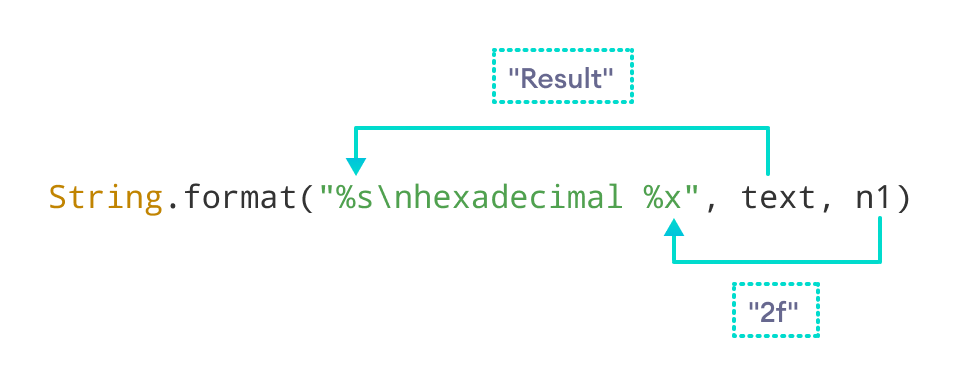
    System.out.println(String.format("%s\nhexadecimal: %x", text, n1));


  }
}
Output
Result
hexadecimal: 2f
Here, %s is replaced with the value of text. Similarly, %o is replaced with the hexadecimal value of n1.
Example 4: Formatting of Decimal Numbers
class Main {
  public static void main(String[] args) {

    float n1 = -452.534f;
    double n2 = -345.766d;

    // format floating-point as it is
    System.out.println(String.format("n1 = %f", n1)); // -452.533997

    System.out.println(String.format("n2 = %f", n2)); // -345.766000

    // show up to two decimal places
    System.out.println(String.format("n1 = %.2f", n1)); // -452.53

    System.out.println(String.format("n2 = %.2f", n2)); // -345.77
  }
}
Output
n1 = -452.533997
n2 = -345.766000
n1 = -452.53
n2 = -345.77
Note: When we format -452.534 using %f, we are getting -452.533997. It is not because of the format() method. Java doesn't return the exact representation of floating-point numbers.
When %.2f format specifier is used, format() gives two numbers after the decimal point.
Example 5: Padding Numbers With Spaces and 0
// using more than one format specifiers
// in a format string
class Main {
  public static void main(String[] args) {
    int n1 = 46, n2 = -46;
    String result;

    // padding number with spaces
    // the length of the string will be 5
    result = String.format("|%5d|", n1); // |   46|

    System.out.println(result);

    // padding number with numbers 0
    // the length of the string will be 5
    result = String.format("|%05d|", n1); // |00046|

    System.out.println(result);

    // using signs before numbers
    result = String.format("%+d", n1); // +46

    System.out.println(result);

    result = String.format("%+d", n2); // -46

    System.out.println(result);

    // enclose negative number within parenthesis
    // and removing the sign
    result = String.format("%(d", n2); // (46)

    System.out.println(result);
  }
}
Example 6: Using 0x and 0 before Hexadecimal and Octal
// using 0x before hexadecimal
// using 0 before octal
class Main {
  public static void main(String[] args) {
    int n = 46;

    System.out.println(String.format("%#o", n)); // 056
    System.out.println(String.format("%#x", n)); // 0x2e

  }
}
Java String format() with Locale
The String format() method also has another syntax if you have to work with the specified locale.
String.format(Locale l,
              String format,
              Object... args)
Example 7: Using GERMAN Locale in format()
// to use Locale
import java.util.Locale;

class Main {
  public static void main(String[] args) {
    int number = 8652145;
    String result;

    // using the current locale
    result = String.format("Number: %,d", number);

    System.out.println(result);

    // using the GERMAN locale as the first argument
    result = String.format(Locale.GERMAN, "Number in German: %,d", number);

    System.out.println(result);
  }
}
Output
Number: 8,652,145
Number in German: 8.652.145
Note: In Germany, integers are separated by . instead of ,.


