
Java String substring()
In this tutorial, we will learn about the Java String substring() method with the help of examples.
The Java substring() method extracts a part of the string (substring) and returns it.
Example
class Main {
  public static void main(String[] args) {
    String str1 = "java is fun";

    // extract substring from index 0 to 3
    System.out.println(str1.substring(0, 4));

  }
}

// Output: java
substring() Syntax
string.substring(int startIndex, int endIndex)
substring() Parameters
The substring() method can take a maximum of two arguments.
- startIndex - the beginning index
- endIndex (optional) - the ending index
substring() Return Value
The substring() method returns a substring from the given string.
- The substring begins with the character at the startIndex and extends to the character at index
endIndex - 1 - If the endIndex is not passed, the substring begins with the character at the specified index and extends to the end of the string
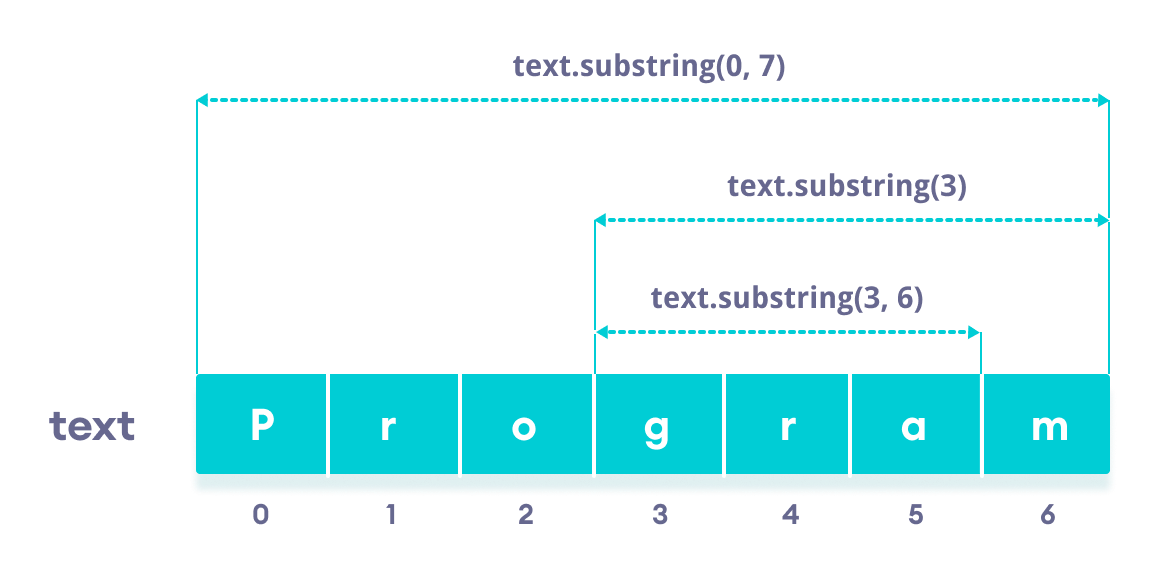
Note: You will get an error if
- startIndex/endIndex is negative or greater than string's length
- startIndex is greater than endIndex
Example 1: Java substring() With Only Start Index
class Main {
  public static void main(String[] args) {
    String str1 = "program";

    //  1st character to the last character
    System.out.println(str1.substring(0));  // program


    // 4th character to the last character
    System.out.println(str1.substring(3));  // gram
  }
}
Example 2: Java substring() With Start and End Index
class Main {
  public static void main(String[] args) {
    String str1 = "program";

    // 1st to the 7th  character
    System.out.println(str1.substring(0, 7));  // program

    // 1st to the 5th  character
    System.out.println(str1.substring(0, 5));  // progr


    // 4th to the 5th character
    System.out.println(str1.substring(3, 5));  // gr
  }
}
Also Read:
Share on:


Did you find this article helpful?