
Python List copy()
In this tutorial, we will learn about the Python List copy() method with the help of examples.
The copy() method returns a shallow copy of the list. Here's a quick example:
models = ['Claude', 'ChatGPT', 'Gemini']

ai_models = models.copy()
print(ai_models)

# Output: ['Claude', 'ChatGPT', 'Gemini']
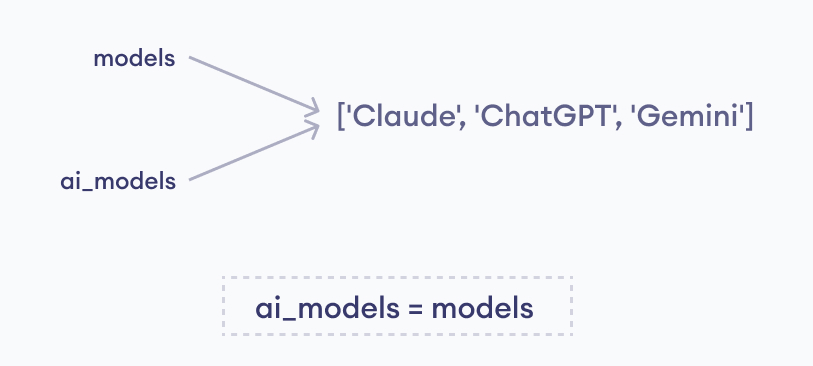
It is important to note that we can't just use = to copy a list.
For example, the statement ai_models = models makes both ai_models and models point to the same object (rather than creating a copy). Therefore, changes made to one list also affects the other.
copy() Syntax
The syntax of copy() is:
new_list = my_list.copy()Arguments
copy() doesn't take any arguments.
Return Value
copy() returns a shallow copy of the list.
Example: Reference Assignment
As mentioned above, using = without copy() makes a variable reference the same list without creating a copy. Therefore, if you make changes to one list, the changes will also be reflected in the other.
models = ['Claude', 'ChatGPT', 'Gemini']

ai_models = models

# Removing the last item
models.pop()

print(f'Models: {models}')
print(f'AI Models: {ai_models}')
Output
Models: ['Claude', 'ChatGPT']
AI Models: ['Claude', 'ChatGPT']
As we can see, when models is changed, ai_models is also modified because we haven't used copy().
Example: Copy Using Slicing
Instead of using copy(), we can also use list slicing to copy a list.
models = ['Claude', 'ChatGPT']

# Copy using slicing
ai_models = models[:]

models.append("Gemini")

print(f'Models: {models}')
print(f'AI Models: {ai_models}')
Output
Models: ['Claude', 'ChatGPT', 'Gemini']
AI Models: ['Claude', 'ChatGPT']
You can read more about Python slicing here.


