
Python while Loop
In this tutorial, we will learn about the while loop in Python programming with the help of examples.
In Python, a while loop is used to run a block of code until the specified condition is True.
While Loop Syntax
while condition:
    # Run this block of code
Read the above code as: while the condition is true, run this block of code.
This means the loop only stops when condition evaluates to False. If condition never evaluates to False, the loop never stops running, creating an infinite loop.
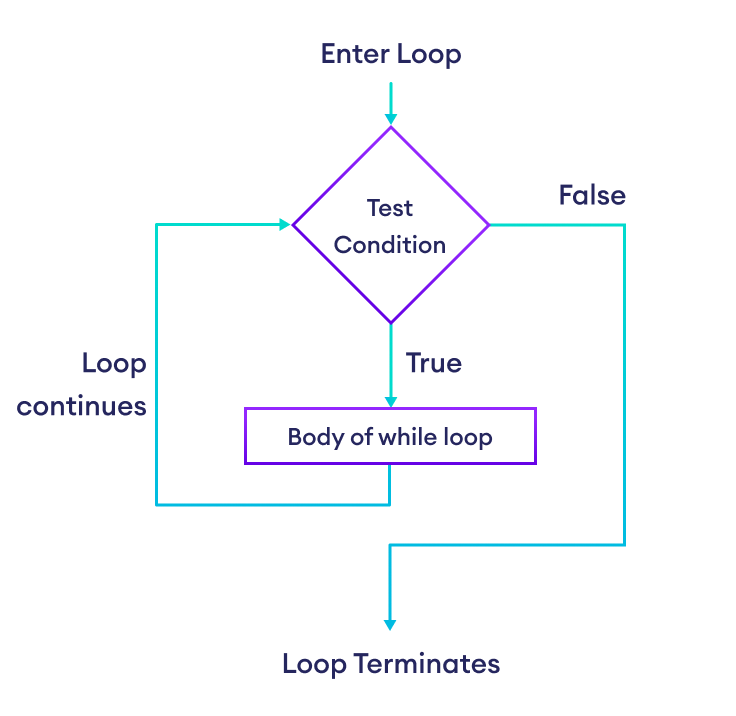
Let's see an example of an infinite loop first. Then, you'll see how to handle it.
Example: Infinite while Loop
number = float(input("Enter a number: "))

while number >= 0.0:
    print(number)
Output
Enter a number: 12.0
12.0
12.0
12.0
...
Here, if the user enters a non-negative number like 12.0, number >= 0.0 evaluates to True and the number is printed.
Since the number variable never changes, number >= 0.0 always remains True. As a result, the same number is printed in each iteration again and again.
Example: Finite while Loop
To handle the infinite loop issue of the above program, we can add code inside the loop's body to take input for number. So the next time number >= 0.0 is evaluated, its result could be different.
number = float(input("Enter a number: "))

while number >= 0.0:
    print(number)

    # Take number input again
    number = float(input("Enter another number: "))
Output
Enter a number: 12.0
12.0
Enter another number: 5.5
5.5
Enter another number: -2.1
If you're finding this program confusing, you can always click the "Visualize" button above to see what happens at each step.
Indentation
Indentation (spaces at the beginning of a statement) is part of the Python syntax. We use indentation to specify a block of code, such as the body of a while loop. For example,
task = input("Task: ")

while task != "q":
    print("Task done!")
    task = input("Task: ")

# This statement is outside the loop
print("All tasks completed")
Output
Task: Cooking
Task done!
Task: Cleaning
Task done!
Task: q
All tasks completed
Here print("All tasks completed") is outside the loop and only executed once at the end.
Example: Print Numbers from 1 to n
n = 10
i = 1

while i <= n:
    print(i)
    i += 1
Output
1
2
...
10
Here, the value of i is printed and increased by 1 in each iteration. When i becomes 11, i <= n evaluates to False and the loop terminates.
If we are iterating a loop a certain number of times (like n times), it's easier to perform such tasks using a for loop. The above program is equivalent to:
n = 10

# Iterate from i = 1 to n
for i in range(1, n+1):
    print(i)
Example: Sum Numbers Until User Enters Zero
In this program, we'll add numbers entered by the user one by one until user enters zero. When user enters 0, we'll terminate the loop and display the total.
total = 0
n = float(input("Enter a number (0 to stop): "))

while n != 0.0:
    total += n
    n = float(input("Enter a number (0 to stop): "))

print(f"Sum: {total}")
Output
Enter a number (0 to stop): 12.5
Enter a number (0 to stop): 11
Enter a number (0 to stop): 10
Enter a number (0 to stop): 0
Sum: 33.5
Again, if you're having trouble following this program, click Visualize above to see exactly what happens at each step.
Break and Continue Statements
The break and continue statements are used to alter the flow of loops.
The break Statement
The break statement terminates the while loop immediately when it's encountered. For example,
while True:
    number = int(input("Enter a number: "))
    if number == 0:
        break
    print(number)
Output
Enter a number: 12
12
Enter a number: 5
5
Enter a number: 0
Here, the loop condition is always True. The only way to terminate this loop is by using a break statement. This happens if the users enters 0 as input.
The continue Statement
The continue statement skips the current iteration of the loop and continues with the next iteration. For example,
i = 0

while i <= 10:
    i += 1

    # Skip odd numbers
    if i % 2 != 0:
        continue

    print(i)
Output
2
4
6
8
10
The while loop runs as long as i is less than or equal to 10. However, when i is odd, the continue statement executes, which skips the remaining code after it (print statement) and continues to the next iteration. That's why only even numbers are displayed in the output.
While Loop with Else Clause
A while loop can have an optional else clause. This feature is unique to Python and is not found in most other languages.
The code inside the else clause is executed when the loop is finished. However, if the loop is terminated by using a break statement, the else block will not be executed. For example,
attempts = 3

while attempts > 0:
    pin = input("Enter PIN: ")

    if pin == "1212":
        print("Access granted.")
        break

    attempts -= 1
    print(f"Wrong PIN. {attempts} tries left.")
else:
    print("Account locked. Too many failed attempts.")
Output 1
Enter PIN: 1111
Wrong PIN. 2 tries left.
Enter PIN: 1212
Access granted.
Output 2
Enter PIN: 1111
Wrong PIN. 2 tries left.
Enter PIN: 2222
Wrong PIN. 1 tries left.
Enter PIN: 3333
Wrong PIN. 0 tries left.
Account locked. Too many failed attempts.
The logic here is:
- If the correct PIN is entered, the
breakstatement terminates the loop and the account locked message insideelseis not displayed. - If an incorrect PIN is entered three times, the loop condition,
attempts > 0, evaluates toFalseand the loop terminates because of it. In this case, account locked message is displayed inside theelseclause.


