
Linked List Operations: Traverse, Insert and Delete
There are various linked list operations that allow us to perform different actions on linked lists. For example, the insertion operation adds a new element to the linked list.
Here's a list of basic linked list operations that we will cover in this article.
- Traversal - access each element of the linked list
- Insertion - adds a new element to the linked list
- Deletion - removes the existing elements
- Search - find a node in the linked list
- Sort - sort the nodes of the linked list
Before you learn about linked list operations in detail, make sure to know about Linked List first.
Things to Remember about Linked List
- head points to the first node of the linked list
- next pointer of the last node is NULL, so if the next current node is NULL, we have reached the end of the linked list.
In all of the examples, we will assume that the linked list has three nodes 1 --->2 --->3 with node structure as below:
struct node {
  int data;
  struct node *next;
};
Traverse a Linked List
Displaying the contents of a linked list is very simple. We keep moving the temp node to the next one and display its contents.
When temp is NULL, we know that we have reached the end of the linked list so we get out of the while loop.
struct node *temp = head;
printf("\n\nList elements are - \n");
while(temp != NULL) {
  printf("%d --->",temp->data);
  temp = temp->next;
}
The output of this program will be:
List elements are -
1 --->2 --->3 --->
Insert Elements to a Linked List
You can add elements to either the beginning, middle or end of the linked list.
1. Insert at the beginning
- Allocate memory for new node
- Store data
- Change next of new node to point to head
- Change head to point to recently created node
struct node *newNode;
newNode = malloc(sizeof(struct node));
newNode->data = 4;
newNode->next = head;
head = newNode;
2. Insert at the End
- Allocate memory for new node
- Store data
- Traverse to last node
- Change next of last node to recently created node
struct node *newNode;
newNode = malloc(sizeof(struct node));
newNode->data = 4;
newNode->next = NULL;

struct node *temp = head;
while(temp->next != NULL){
  temp = temp->next;
}

temp->next = newNode;
3. Insert at the Middle
- Allocate memory and store data for new node
- Traverse to node just before the required position of new node
- Change next pointers to include new node in between
struct node *newNode;
newNode = malloc(sizeof(struct node));
newNode->data = 4;

struct node *temp = head;

for(int i=2; i < position; i++) {
  if(temp->next != NULL) {
    temp = temp->next;
  }
}
newNode->next = temp->next;
temp->next = newNode;
Delete from a Linked List
You can delete either from the beginning, end or from a particular position.
1. Delete from beginning
- Point head to the second node
head = head->next;
2. Delete from end
- Traverse to second last element
- Change its next pointer to null
struct node* temp = head;
while(temp->next->next!=NULL){
  temp = temp->next;
}
temp->next = NULL;
3. Delete from middle
- Traverse to element before the element to be deleted
- Change next pointers to exclude the node from the chain
for(int i=2; i< position; i++) {
  if(temp->next!=NULL) {
    temp = temp->next;
  }
}

temp->next = temp->next->next;
Search an Element on a Linked List
You can search an element on a linked list using a loop using the following steps. We are finding item on a linked list.
- Make
headas thecurrentnode. - Run a loop until the
currentnode isNULLbecause the last element points toNULL. - In each iteration, check if the key of the node is equal to
item. If it the key matches the item, returntrueotherwise returnfalse.
// Search a node
bool searchNode(struct Node** head_ref, int key) {
  struct Node* current = *head_ref;

  while (current != NULL) {
    if (current->data == key) return true;
      current = current->next;
  }
  return false;
}
Sort Elements of a Linked List
We will use a simple sorting algorithm, Bubble Sort, to sort the elements of a linked list in ascending order below.
- Make the
headas thecurrentnode and create another nodeindexfor later use. - If
headis null, return. - Else, run a loop till the last node (i.e.
NULL). - In each iteration, follow the following step 5-6.
- Store the next node of
currentinindex. - Check if the data of the current node is greater than the next node. If it is greater, swap
currentandindex.
Check the article on bubble sort for better understanding of its working.
// Sort the linked list
void sortLinkedList(struct Node** head_ref) {
  struct Node *current = *head_ref, *index = NULL;
  int temp;

  if (head_ref == NULL) {
    return;
  } else {
    while (current != NULL) {
      // index points to the node next to current
      index = current->next;

  	while (index != NULL) {
        if (current->data > index->data) {
          temp = current->data;
          current->data = index->data;
          index->data = temp;
    	  }
    	  index = index->next;
  	}
  	current = current->next;
    }
  }
}
LinkedList Operations in Python, Java, C, and C++
Linked List Operations Visualization: Don't just read about linked list operations, watch it happen live. See how each line works step-by-step with our new DSA visualizer. Try it yourself!
# Linked list operations in Python


# Create a node
class Node:
    def __init__(self, data):
        self.data = data
        self.next = None


class LinkedList:

    def __init__(self):
        self.head = None

    # Insert at the beginning
    def insertAtBeginning(self, new_data):
        new_node = Node(new_data)

        new_node.next = self.head
        self.head = new_node

    # Insert after a node
    def insertAfter(self, prev_node, new_data):

        if prev_node is None:
            print("The given previous node must inLinkedList.")
            return

        new_node = Node(new_data)
        new_node.next = prev_node.next
        prev_node.next = new_node

    # Insert at the end
    def insertAtEnd(self, new_data):
        new_node = Node(new_data)

        if self.head is None:
            self.head = new_node
            return

        last = self.head
        while (last.next):
            last = last.next

        last.next = new_node

    # Deleting a node
    def deleteNode(self, position):

        if self.head is None:
            return

        temp = self.head

        if position == 0:
            self.head = temp.next
            temp = None
            return

        # Find the key to be deleted
        for i in range(position - 1):
            temp = temp.next
            if temp is None:
                break

        # If the key is not present
        if temp is None:
            return

        if temp.next is None:
            return

        next = temp.next.next

        temp.next = None

        temp.next = next

    # Search an element
    def search(self, key):

        current = self.head

        while current is not None:
            if current.data == key:
                return True

            current = current.next

        return False

    # Sort the linked list
    def sortLinkedList(self, head):
        current = head
        index = Node(None)

        if head is None:
            return
        else:
            while current is not None:
                # index points to the node next to current
                index = current.next

                while index is not None:
                    if current.data > index.data:
                        current.data, index.data = index.data, current.data

                    index = index.next
                current = current.next

    # Print the linked list
    def printList(self):
        temp = self.head
        while (temp):
            print(str(temp.data) + " ", end="")
            temp = temp.next


if __name__ == '__main__':

    llist = LinkedList()
    llist.insertAtEnd(1)
    llist.insertAtBeginning(2)
    llist.insertAtBeginning(3)
    llist.insertAtEnd(4)
    llist.insertAfter(llist.head.next, 5)

    print('linked list:')
    llist.printList()

    print("\nAfter deleting an element:")
    llist.deleteNode(3)
    llist.printList()

    print()
    item_to_find = 3
    if llist.search(item_to_find):
        print(str(item_to_find) + " is found")
    else:
        print(str(item_to_find) + " is not found")

    llist.sortLinkedList(llist.head)
    print("Sorted List: ")
    llist.printList()
// Linked list operations in Java

class LinkedList {
  Node head;

  // Create a node
  class Node {
    int data;
    Node next;

    Node(int d) {
      data = d;
      next = null;
    }
  }

  // Insert at the beginning
  public void insertAtBeginning(int new_data) {
    // insert the data
    Node new_node = new Node(new_data);
    new_node.next = head;
    head = new_node;
  }

  // Insert after a node
  public void insertAfter(Node prev_node, int new_data) {
    if (prev_node == null) {
      System.out.println("The given previous node cannot be null");
      return;
    }
    Node new_node = new Node(new_data);
    new_node.next = prev_node.next;
    prev_node.next = new_node;
  }

  // Insert at the end
  public void insertAtEnd(int new_data) {
    Node new_node = new Node(new_data);

    if (head == null) {
      head = new Node(new_data);
      return;
    }

    new_node.next = null;

    Node last = head;
    while (last.next != null)
      last = last.next;

    last.next = new_node;
    return;
  }

  // Delete a node
  void deleteNode(int position) {
    if (head == null)
      return;

    Node temp = head;

    if (position == 0) {
      head = temp.next;
      return;
    }
    // Find the key to be deleted
    for (int i = 0; temp != null && i < position - 1; i++)
      temp = temp.next;

    // If the key is not present
    if (temp == null || temp.next == null)
      return;

    // Remove the node
    Node next = temp.next.next;

    temp.next = next;
  }

  // Search a node
  boolean search(Node head, int key) {
    Node current = head;
    while (current != null) {
      if (current.data == key)
        return true;
      current = current.next;
    }
    return false;
  }

  // Sort the linked list
  void sortLinkedList(Node head) {
    Node current = head;
    Node index = null;
    int temp;

    if (head == null) {
      return;
    } else {
      while (current != null) {
        // index points to the node next to current
        index = current.next;

        while (index != null) {
          if (current.data > index.data) {
            temp = current.data;
            current.data = index.data;
            index.data = temp;
          }
          index = index.next;
        }
        current = current.next;
      }
    }
  }

  // Print the linked list
  public void printList() {
    Node tnode = head;
    while (tnode != null) {
      System.out.print(tnode.data + " ");
      tnode = tnode.next;
    }

  }

  public static void main(String[] args) {
    LinkedList llist = new LinkedList();

    llist.insertAtEnd(1);
    llist.insertAtBeginning(2);
    llist.insertAtBeginning(3);
    llist.insertAtEnd(4);
    llist.insertAfter(llist.head.next, 5);

    System.out.println("Linked list: ");
    llist.printList();

    System.out.println("\nAfter deleting an element: ");
    llist.deleteNode(3);
    llist.printList();

    System.out.println();
    int item_to_find = 3;
    if (llist.search(llist.head, item_to_find))
      System.out.println(item_to_find + " is found");
    else
      System.out.println(item_to_find + " is not found");

    llist.sortLinkedList(llist.head);
    System.out.println("\nSorted List: ");
    llist.printList();
  }
}
// Linked list operations in C

#include <stdio.h>
#include <stdlib.h>

// Create a node
struct Node {
  int data;
  struct Node* next;
};

// Insert at the beginning
void insertAtBeginning(struct Node** head_ref, int new_data) {
  // Allocate memory to a node
  struct Node* new_node = (struct Node*)malloc(sizeof(struct Node));

  // insert the data
  new_node->data = new_data;

  new_node->next = (*head_ref);

  // Move head to new node
  (*head_ref) = new_node;
}

// Insert a node after a node
void insertAfter(struct Node* prev_node, int new_data) {
  if (prev_node == NULL) {
  printf("the given previous node cannot be NULL");
  return;
  }

  struct Node* new_node = (struct Node*)malloc(sizeof(struct Node));
  new_node->data = new_data;
  new_node->next = prev_node->next;
  prev_node->next = new_node;
}

// Insert the the end
void insertAtEnd(struct Node** head_ref, int new_data) {
  struct Node* new_node = (struct Node*)malloc(sizeof(struct Node));
  struct Node* last = *head_ref; /* used in step 5*/

  new_node->data = new_data;
  new_node->next = NULL;

  if (*head_ref == NULL) {
  *head_ref = new_node;
  return;
  }

  while (last->next != NULL) last = last->next;

  last->next = new_node;
  return;
}

// Delete a node
void deleteNode(struct Node** head_ref, int key) {
  struct Node *temp = *head_ref, *prev;

  if (temp != NULL && temp->data == key) {
  *head_ref = temp->next;
  free(temp);
  return;
  }
  // Find the key to be deleted
  while (temp != NULL && temp->data != key) {
  prev = temp;
  temp = temp->next;
  }

  // If the key is not present
  if (temp == NULL) return;

  // Remove the node
  prev->next = temp->next;

  free(temp);
}

// Search a node
int searchNode(struct Node** head_ref, int key) {
  struct Node* current = *head_ref;

  while (current != NULL) {
  if (current->data == key) return 1;
  current = current->next;
  }
  return 0;
}

// Sort the linked list
void sortLinkedList(struct Node** head_ref) {
  struct Node *current = *head_ref, *index = NULL;
  int temp;

  if (head_ref == NULL) {
  return;
  } else {
  while (current != NULL) {
    // index points to the node next to current
    index = current->next;

    while (index != NULL) {
    if (current->data > index->data) {
      temp = current->data;
      current->data = index->data;
      index->data = temp;
    }
    index = index->next;
    }
    current = current->next;
  }
  }
}

// Print the linked list
void printList(struct Node* node) {
  while (node != NULL) {
  printf(" %d ", node->data);
  node = node->next;
  }
}

// Driver program
int main() {
  struct Node* head = NULL;

  insertAtEnd(&head, 1);
  insertAtBeginning(&head, 2);
  insertAtBeginning(&head, 3);
  insertAtEnd(&head, 4);
  insertAfter(head->next, 5);

  printf("Linked list: ");
  printList(head);

  printf("\nAfter deleting an element: ");
  deleteNode(&head, 3);
  printList(head);

  int item_to_find = 3;
  if (searchNode(&head, item_to_find)) {
  printf("\n%d is found", item_to_find);
  } else {
  printf("\n%d is not found", item_to_find);
  }

  sortLinkedList(&head);
  printf("\nSorted List: ");
  printList(head);
}
// Linked list operations in C++

#include <stdlib.h>

#include <iostream>
using namespace std;

// Create a node
struct Node {
  int data;
  struct Node* next;
};

void insertAtBeginning(struct Node** head_ref, int new_data) {
  // Allocate memory to a node
  struct Node* new_node = (struct Node*)malloc(sizeof(struct Node));

  // insert the data
  new_node->data = new_data;
  new_node->next = (*head_ref);

  // Move head to new node
  (*head_ref) = new_node;
}

// Insert a node after a node
void insertAfter(struct Node* prev_node, int new_data) {
  if (prev_node == NULL) {
  cout << "the given previous node cannot be NULL";
  return;
  }

  struct Node* new_node = (struct Node*)malloc(sizeof(struct Node));
  new_node->data = new_data;
  new_node->next = prev_node->next;
  prev_node->next = new_node;
}

// Insert at the end
void insertAtEnd(struct Node** head_ref, int new_data) {
  struct Node* new_node = (struct Node*)malloc(sizeof(struct Node));
  struct Node* last = *head_ref; /* used in step 5*/

  new_node->data = new_data;
  new_node->next = NULL;

  if (*head_ref == NULL) {
  *head_ref = new_node;
  return;
  }

  while (last->next != NULL) last = last->next;

  last->next = new_node;
  return;
}

// Delete a node
void deleteNode(struct Node** head_ref, int key) {
  struct Node *temp = *head_ref, *prev;

  if (temp != NULL && temp->data == key) {
  *head_ref = temp->next;
  free(temp);
  return;
  }
  // Find the key to be deleted
  while (temp != NULL && temp->data != key) {
  prev = temp;
  temp = temp->next;
  }

  // If the key is not present
  if (temp == NULL) return;

  // Remove the node
  prev->next = temp->next;

  free(temp);
}

// Search a node
bool searchNode(struct Node** head_ref, int key) {
  struct Node* current = *head_ref;

  while (current != NULL) {
  if (current->data == key) return true;
  current = current->next;
  }
  return false;
}

// Sort the linked list
void sortLinkedList(struct Node** head_ref) {
  struct Node *current = *head_ref, *index = NULL;
  int temp;

  if (head_ref == NULL) {
  return;
  } else {
  while (current != NULL) {
    // index points to the node next to current
    index = current->next;

    while (index != NULL) {
    if (current->data > index->data) {
      temp = current->data;
      current->data = index->data;
      index->data = temp;
    }
    index = index->next;
    }
    current = current->next;
  }
  }
}

// Print the linked list
void printList(struct Node* node) {
  while (node != NULL) {
  cout << node->data << " ";
  node = node->next;
  }
}

// Driver program
int main() {
  struct Node* head = NULL;

  insertAtEnd(&head, 1);
  insertAtBeginning(&head, 2);
  insertAtBeginning(&head, 3);
  insertAtEnd(&head, 4);
  insertAfter(head->next, 5);

  cout << "Linked list: ";
  printList(head);

  cout << "\nAfter deleting an element: ";
  deleteNode(&head, 3);
  printList(head);

  int item_to_find = 3;
  if (searchNode(&head, item_to_find)) {
  cout << endl << item_to_find << " is found";
  } else {
  cout << endl << item_to_find << " is not found";
  }

  sortLinkedList(&head);
  cout << "\nSorted List: ";
  printList(head);
}
Types of Linked List - Singly linked, doubly linked and circular
Before you learn about the type of the linked list, make sure you know about the LinkedList Data Structure.
There are three common types of Linked List.
Singly Linked List
It is the most common. Each node has data and a pointer to the next node.

Node is represented as:
struct node {
    int data;
    struct node *next;
}
A three-member singly linked list can be created as:
/* Initialize nodes */
struct node *head;
struct node *one = NULL;
struct node *two = NULL;
struct node *three = NULL;

/* Allocate memory */
one = malloc(sizeof(struct node));
two = malloc(sizeof(struct node));
three = malloc(sizeof(struct node));

/* Assign data values */
one->data = 1;
two->data = 2;
three->data = 3;

/* Connect nodes */
one->next = two;
two->next = three;
three->next = NULL;

/* Save address of first node in head */
head = one;
Doubly Linked List
We add a pointer to the previous node in a doubly-linked list. Thus, we can go in either direction: forward or backward.

A node is represented as
struct node {
    int data;
    struct node *next;
    struct node *prev;
}
A three-member doubly linked list can be created as
/* Initialize nodes */
struct node *head;
struct node *one = NULL;
struct node *two = NULL;
struct node *three = NULL;

/* Allocate memory */
one = malloc(sizeof(struct node));
two = malloc(sizeof(struct node));
three = malloc(sizeof(struct node));

/* Assign data values */
one->data = 1;
two->data = 2;
three->data = 3;

/* Connect nodes */
one->next = two;
one->prev = NULL;

two->next = three;
two->prev = one;

three->next = NULL;
three->prev = two;

/* Save address of first node in head */
head = one;
If you want to learn more about it, please visit doubly linked list and operations on it.
Circular Linked List
A circular linked list is a variation of a linked list in which the last element is linked to the first element. This forms a circular loop.
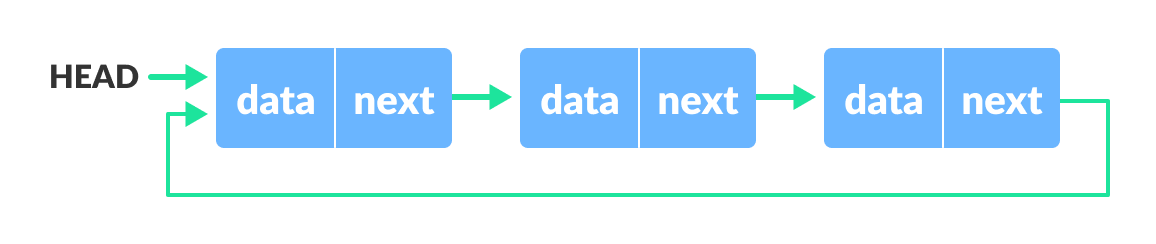
A circular linked list can be either singly linked or doubly linked.
- for singly linked list, next pointer of last item points to the first item
- In the doubly linked list, prev pointer of the first item points to the last item as well.
A three-member circular singly linked list can be created as:
/* Initialize nodes */
struct node *head;
struct node *one = NULL;
struct node *two = NULL;
struct node *three = NULL;

/* Allocate memory */
one = malloc(sizeof(struct node));
two = malloc(sizeof(struct node));
three = malloc(sizeof(struct node));

/* Assign data values */
one->data = 1;
two->data = 2;
three->data = 3;

/* Connect nodes */
one->next = two;
two->next = three;
three->next = one;

/* Save address of first node in head */
head = one;
If you want to learn more about it, please visit circular linked list and operations on it.
Linked list Data Structure
A linked list is a linear data structure that includes a series of connected nodes. Here, each node stores the data and the address of the next node. For example,

You have to start somewhere, so we give the address of the first node a special name called HEAD. Also, the last node in the linked list can be identified because its next portion points to NULL.
Linked lists can be of multiple types: singly, doubly, and circular linked list. In this article, we will focus on the singly linked list. To learn about other types, visit Types of Linked List.
Note: You might have played the game Treasure Hunt, where each clue includes the information about the next clue. That is how the linked list operates.
Representation of Linked List
Let's see how each node of the linked list is represented. Each node consists:
- A data item
- An address of another node
We wrap both the data item and the next node reference in a struct as:
struct node
{
  int data;
  struct node *next;
};
Understanding the structure of a linked list node is the key to having a grasp on it.
Each struct node has a data item and a pointer to another struct node. Let us create a simple Linked List with three items to understand how this works.
/* Initialize nodes */
struct node *head;
struct node *one = NULL;
struct node *two = NULL;
struct node *three = NULL;

/* Allocate memory */
one = malloc(sizeof(struct node));
two = malloc(sizeof(struct node));
three = malloc(sizeof(struct node));

/* Assign data values */
one->data = 1;
two->data = 2;
three->data=3;

/* Connect nodes */
one->next = two;
two->next = three;
three->next = NULL;

/* Save address of first node in head */
head = one;
If you didn't understand any of the lines above, all you need is a refresher on pointers and structs.
In just a few steps, we have created a simple linked list with three nodes.

The power of a linked list comes from the ability to break the chain and rejoin it. E.g. if you wanted to put an element 4 between 1 and 2, the steps would be:
- Create a new struct node and allocate memory to it.
- Add its data value as 4
- Point its next pointer to the struct node containing 2 as the data value
- Change the next pointer of "1" to the node we just created.
Doing something similar in an array would have required shifting the positions of all the subsequent elements.
In python and Java, the linked list can be implemented using classes as shown in the codes below.
Linked List Utility
Lists are one of the most popular and efficient data structures, with implementation in every programming language like C, C++, Python, Java, and C#.
Apart from that, linked lists are a great way to learn how pointers work. By practicing how to manipulate linked lists, you can prepare yourself to learn more advanced data structures like graphs and trees.
Linked List Implementations in Python, Java, C, and C++ Examples
Linked List Visualization: Don't just read about linked list, watch it happen live. See how each line of the data structure works step-by-step with our new DSA visualizer. Try it yourself!
# Linked list implementation in Python


class Node:
    # Creating a node
    def __init__(self, item):
        self.item = item
        self.next = None


class LinkedList:

    def __init__(self):
        self.head = None


if __name__ == '__main__':

    linked_list = LinkedList()

    # Assign item values
    linked_list.head = Node(1)
    second = Node(2)
    third = Node(3)

    # Connect nodes
    linked_list.head.next = second
    second.next = third

    # Print the linked list item
    while linked_list.head != None:
        print(linked_list.head.item, end=" ")
        linked_list.head = linked_list.head.next
// Linked list implementation in Java

class LinkedList {
  // Creating a node
  Node head;

  static class Node {
    int value;
    Node next;

    Node(int d) {
      value = d;
      next = null;
    }
  }

  public static void main(String[] args) {
    LinkedList linkedList = new LinkedList();

    // Assign value values
    linkedList.head = new Node(1);
    Node second = new Node(2);
    Node third = new Node(3);

    // Connect nodess
    linkedList.head.next = second;
    second.next = third;

    // printing node-value
    while (linkedList.head != null) {
      System.out.print(linkedList.head.value + " ");
      linkedList.head = linkedList.head.next;
    }
  }
}
// Linked list implementation in C

#include <stdio.h>
#include <stdlib.h>

// Creating a node
struct node {
  int value;
  struct node *next;
};

// print the linked list value
void printLinkedlist(struct node *p) {
  while (p != NULL) {
    printf("%d ", p->value);
    p = p->next;
  }
}

int main() {
  // Initialize nodes
  struct node *head;
  struct node *one = NULL;
  struct node *two = NULL;
  struct node *three = NULL;

  // Allocate memory
  one = malloc(sizeof(struct node));
  two = malloc(sizeof(struct node));
  three = malloc(sizeof(struct node));

  // Assign value values
  one->value = 1;
  two->value = 2;
  three->value = 3;

  // Connect nodes
  one->next = two;
  two->next = three;
  three->next = NULL;

  // printing node-value
  head = one;
  printLinkedlist(head);
}
// Linked list implementation in C++

#include <bits/stdc++.h>
#include <iostream>
using namespace std;

// Creating a node
class Node {
   public:
  int value;
  Node* next;
};

int main() {
  Node* head;
  Node* one = NULL;
  Node* two = NULL;
  Node* three = NULL;

  // allocate 3 nodes in the heap
  one = new Node();
  two = new Node();
  three = new Node();

  // Assign value values
  one->value = 1;
  two->value = 2;
  three->value = 3;

  // Connect nodes
  one->next = two;
  two->next = three;
  three->next = NULL;

  // print the linked list value
  head = one;
  while (head != NULL) {
    cout << head->value;
    head = head->next;
  }
}
Linked List Complexity
Time Complexity
| Worst case | Average Case | |
|---|---|---|
| Search | O(n) | O(n) |
| Insert | O(1) | O(1) |
| Deletion | O(1) | O(1) |
Space Complexity: O(n)
Linked List Applications
- Dynamic memory allocation
- Implemented in stack and queue
- In undo functionality of softwares
- Hash tables, Graphs
Recommended Readings
1. Tutorials
2. Examples
Circular Queue Data Structure
A circular queue is the extended version of a regular queue where the last element is connected to the first element. Thus forming a circle-like structure.
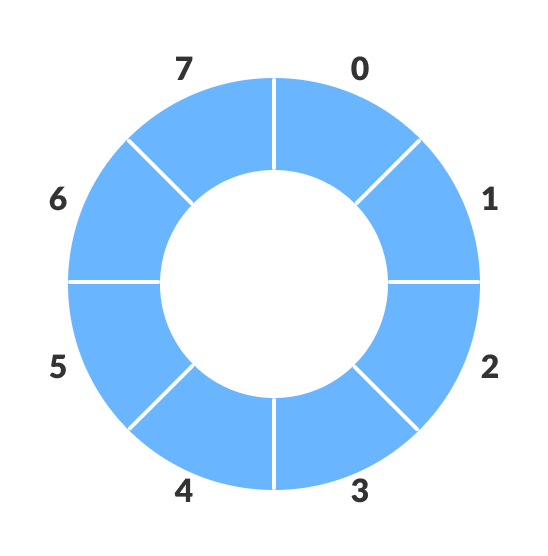
The circular queue solves the major limitation of the normal queue. In a normal queue, after a bit of insertion and deletion, there will be non-usable empty space.
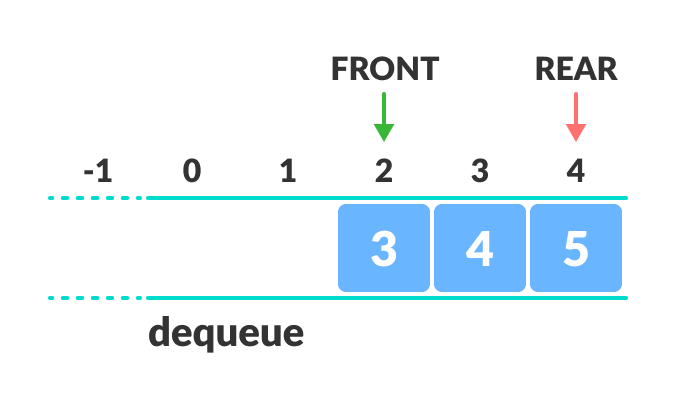
Here, indexes 0 and 1 can only be used after resetting the queue (deletion of all elements). This reduces the actual size of the queue.
How Circular Queue Works
Circular Queue works by the process of circular increment i.e. when we try to increment the pointer and we reach the end of the queue, we start from the beginning of the queue.
Here, the circular increment is performed by modulo division with the queue size. That is,
if REAR + 1 == 5 (overflow!), REAR = (REAR + 1)%5 = 0 (start of queue)
Circular Queue Operations
The circular queue work as follows:
- two pointers FRONT and REAR
- FRONT track the first element of the queue
- REAR track the last elements of the queue
- initially, set value of FRONT and REAR to -1
1. Enqueue Operation
- check if the queue is full
- for the first element, set value of FRONT to 0
- circularly increase the REAR index by 1 (i.e. if the rear reaches the end, next it would be at the start of the queue)
- add the new element in the position pointed to by REAR
2. Dequeue Operation
- check if the queue is empty
- return the value pointed by FRONT
- circularly increase the FRONT index by 1
- for the last element, reset the values of FRONT and REAR to -1
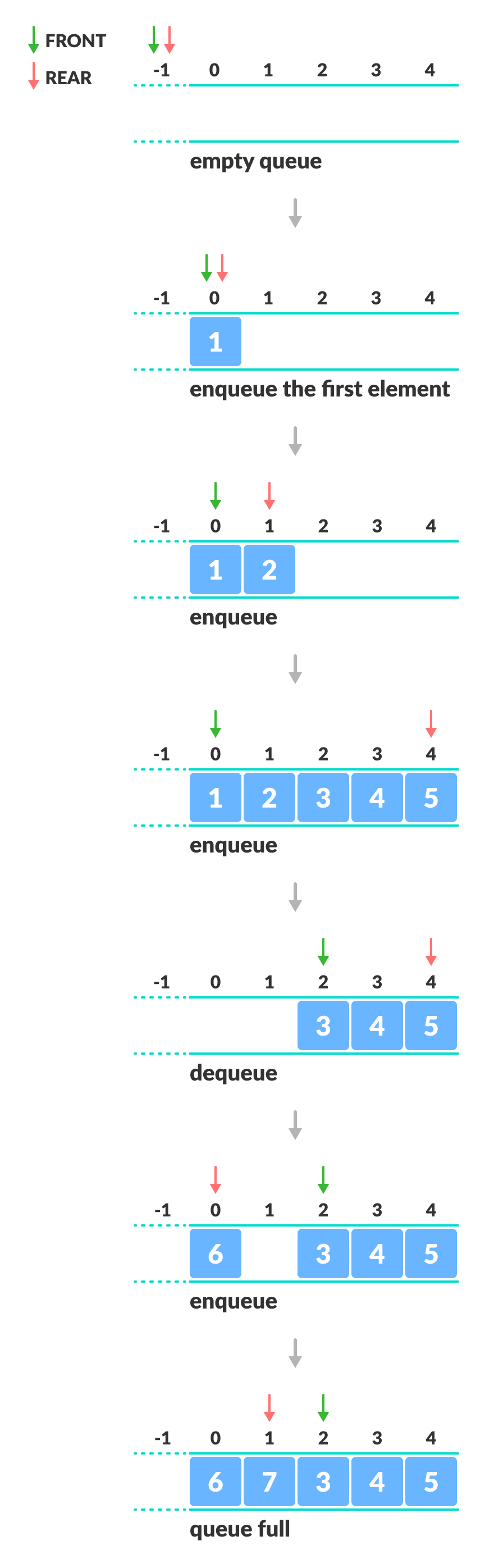
However, the check for full queue has a new additional case:
- Case 1: FRONT = 0 &&
REAR == SIZE - 1 - Case 2:
FRONT = REAR + 1
The second case happens when REAR starts from 0 due to circular increment and when its value is just 1 less than FRONT, the queue is full.
Circular Queue Implementations in Python, Java, C, and C++
The most common queue implementation is using arrays, but it can also be implemented using lists.
# Circular Queue implementation in Python


class MyCircularQueue():

    def __init__(self, k):
        self.k = k
        self.queue = [None] * k
        self.head = self.tail = -1

    # Insert an element into the circular queue
    def enqueue(self, data):

        if ((self.tail + 1) % self.k == self.head):
            print("The circular queue is full\n")

        elif (self.head == -1):
            self.head = 0
            self.tail = 0
            self.queue[self.tail] = data
        else:
            self.tail = (self.tail + 1) % self.k
            self.queue[self.tail] = data

    # Delete an element from the circular queue
    def dequeue(self):
        if (self.head == -1):
            print("The circular queue is empty\n")

        elif (self.head == self.tail):
            temp = self.queue[self.head]
            self.head = -1
            self.tail = -1
            return temp
        else:
            temp = self.queue[self.head]
            self.head = (self.head + 1) % self.k
            return temp

    def printCQueue(self):
        if(self.head == -1):
            print("No element in the circular queue")

        elif (self.tail >= self.head):
            for i in range(self.head, self.tail + 1):
                print(self.queue[i], end=" ")
            print()
        else:
            for i in range(self.head, self.k):
                print(self.queue[i], end=" ")
            for i in range(0, self.tail + 1):
                print(self.queue[i], end=" ")
            print()


# Your MyCircularQueue object will be instantiated and called as such:
obj = MyCircularQueue(5)
obj.enqueue(1)
obj.enqueue(2)
obj.enqueue(3)
obj.enqueue(4)
obj.enqueue(5)
print("Initial queue")
obj.printCQueue()

obj.dequeue()
print("After removing an element from the queue")
obj.printCQueue()
// Circular Queue implementation in Java

public class CQueue {
  int SIZE = 5; // Size of Circular Queue
  int front, rear;
  int items[] = new int[SIZE];

  CQueue() {
    front = -1;
    rear = -1;
  }

  // Check if the queue is full
  boolean isFull() {
    if (front == 0 && rear == SIZE - 1) {
      return true;
    }
    if (front == rear + 1) {
      return true;
    }
    return false;
  }

  // Check if the queue is empty
  boolean isEmpty() {
    if (front == -1)
      return true;
    else
      return false;
  }

  // Adding an element
  void enQueue(int element) {
    if (isFull()) {
      System.out.println("Queue is full");
    } else {
      if (front == -1)
        front = 0;
      rear = (rear + 1) % SIZE;
      items[rear] = element;
      System.out.println("Inserted " + element);
    }
  }

  // Removing an element
  int deQueue() {
    int element;
    if (isEmpty()) {
      System.out.println("Queue is empty");
      return (-1);
    } else {
      element = items[front];
      if (front == rear) {
        front = -1;
        rear = -1;
      } /* Q has only one element, so we reset the queue after deleting it. */
      else {
        front = (front + 1) % SIZE;
      }
      return (element);
    }
  }

  void display() {
    /* Function to display status of Circular Queue */
    int i;
    if (isEmpty()) {
      System.out.println("Empty Queue");
    } else {
      System.out.println("Front -> " + front);
      System.out.println("Items -> ");
      for (i = front; i != rear; i = (i + 1) % SIZE)
        System.out.print(items[i] + " ");
      System.out.println(items[i]);
      System.out.println("Rear -> " + rear);
    }
  }

  public static void main(String[] args) {

    CQueue q = new CQueue();

    // Fails because front = -1
    q.deQueue();

    q.enQueue(1);
    q.enQueue(2);
    q.enQueue(3);
    q.enQueue(4);
    q.enQueue(5);

    // Fails to enqueue because front == 0 && rear == SIZE - 1
    q.enQueue(6);

    q.display();

    int elem = q.deQueue();

    if (elem != -1) {
      System.out.println("Deleted Element is " + elem);
    }
    q.display();

    q.enQueue(7);

    q.display();

    // Fails to enqueue because front == rear + 1
    q.enQueue(8);
  }

}
// Circular Queue implementation in C

#include <stdio.h>

#define SIZE 5

int items[SIZE];
int front = -1, rear = -1;

// check if the queue is full
int isFull() {
  if ((front == (rear + 1) % SIZE) || (front == 0 && rear == SIZE - 1)) return 1;
  return 0;
}

// check if the queue is empty
int isEmpty() {
  if (front == -1) return 1;
  return 0;
}

// adding an element
void enQueue(int element) {
  if (isFull())
    printf("\n Queue is full!! \n");
  else {
    if (front == -1) front = 0;
    rear = (rear + 1) % SIZE;
    items[rear] = element;
    printf("\n Inserted -> %d", element);
  }
}

// removing an element
int deQueue() {
  int element;
  if (isEmpty()) {
    printf("\n Queue is empty !! \n");
    return (-1);
  } else {
    element = items[front];
    if (front == rear) {
      front = -1;
      rear = -1;
    }
    // Q has only one element, so we reset the
    // queue after dequeing it. ?
    else {
      front = (front + 1) % SIZE;
    }
    printf("\n Deleted element -> %d \n", element);
    return (element);
  }
}

// display the queue
void display() {
  int i;
  if (isEmpty())
    printf(" \n Empty Queue\n");
  else {
    printf("\n Front -> %d ", front);
    printf("\n Items -> ");
    for (i = front; i != rear; i = (i + 1) % SIZE) {
      printf("%d ", items[i]);
    }
    printf("%d ", items[i]);
    printf("\n Rear -> %d \n", rear);
  }
}

int main() {
  // fails because front = -1
  deQueue();

  enQueue(1);
  enQueue(2);
  enQueue(3);
  enQueue(4);
  enQueue(5);

  // fails to enqueue because front == 0 && rear == SIZE - 1
  enQueue(6);

  display();
  deQueue();

  display();

  enQueue(7);
  display();

  // fails to enqueue because front == rear + 1
  enQueue(8);

  return 0;
}
// Circular Queue implementation in C++

#include <iostream>
#define SIZE 5 /* Size of Circular Queue */

using namespace std;

class Queue {
   private:
  int items[SIZE], front, rear;

   public:
  Queue() {
    front = -1;
    rear = -1;
  }
  // Check if the queue is full
  bool isFull() {
    if (front == 0 && rear == SIZE - 1) {
      return true;
    }
    if (front == (rear + 1) % SIZE) {
      return true;
    }
    return false;
  }

  // Check if the queue is empty
  bool isEmpty() {
    if (front == -1)
      return true;
    else
      return false;
  }
  // Adding an element
  void enQueue(int element) {
    if (isFull()) {
      cout << "Queue is full" << endl;
    } else {
      if (front == -1) front = 0;
      rear = (rear + 1) % SIZE;
      items[rear] = element;
      cout << endl
         << "Inserted " << element << endl;
    }
  }
  // Removing an element
  int deQueue() {
    int element;
    if (isEmpty()) {
      cout << "Queue is empty" << endl;
      return (-1);
    } else {
      element = items[front];
      if (front == rear) {
        front = -1;
        rear = -1;
      }
      // Q has only one element,
      // so we reset the queue after deleting it.
      else {
        front = (front + 1) % SIZE;
      }
      return (element);
    }
  }

  void display() {
    // Function to display status of Circular Queue
    int i;
    if (isEmpty()) {
      cout << endl
         << "Empty Queue" << endl;
    } else {
      cout << "Front -> " << front;
      cout << endl
         << "Items -> ";
      for (i = front; i != rear; i = (i + 1) % SIZE)
        cout << items[i] << "\t";
      cout << items[i];
      cout << endl
         << "Rear -> " << rear << endl;
    }
  }
};

int main() {
  Queue q;

  // Fails because front = -1
  q.deQueue();

  q.enQueue(1);
  q.enQueue(2);
  q.enQueue(3);
  q.enQueue(4);
  q.enQueue(5);

  // Fails to enqueue because front == 0 && rear == SIZE - 1
  q.enQueue(6);

  q.display();

  int elem = q.deQueue();

  if (elem != -1)
    cout << endl
       << "Deleted Element is " << elem << endl;

  q.display();

  q.enQueue(7);

  q.display();

  // Fails to enqueue because front == rear + 1
  q.enQueue(8);

  return 0;
}
Circular Queue Complexity Analysis
The complexity of the enqueue and dequeue operations of a circular queue is O(1) for (array implementations).
Applications of Circular Queue
- CPU scheduling
- Memory management
- Traffic Management
Queue Data Structure
A queue is a useful data structure in programming. It is similar to the ticket queue outside a cinema hall, where the first person entering the queue is the first person who gets the ticket.
Queue follows the First In First Out (FIFO) rule - the item that goes in first is the item that comes out first.

In the above image, since 1 was kept in the queue before 2, it is the first to be removed from the queue as well. It follows the FIFO rule.
In programming terms, putting items in the queue is called enqueue, and removing items from the queue is called dequeue.
We can implement the queue in any programming language like C, C++, Java, Python or C#, but the specification is pretty much the same.
Basic Operations of Queue
A queue is an object (an abstract data structure - ADT) that allows the following operations:
- Enqueue: Add an element to the end of the queue
- Dequeue: Remove an element from the front of the queue
- IsEmpty: Check if the queue is empty
- IsFull: Check if the queue is full
- Peek: Get the value of the front of the queue without removing it
Working of Queue
Queue operations work as follows:
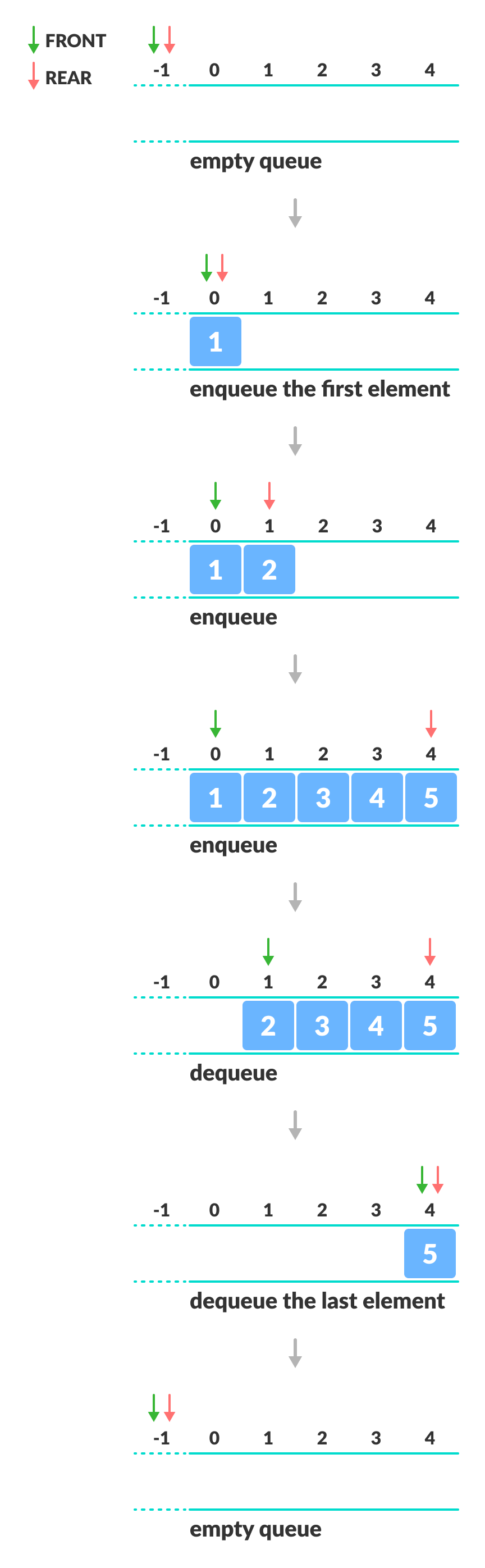
- two pointers FRONT and REAR
- FRONT track the first element of the queue
- REAR track the last element of the queue
- initially, set value of FRONT and REAR to -1
Enqueue Operation
- check if the queue is full
- for the first element, set the value of FRONT to 0
- increase the REAR index by 1
- add the new element in the position pointed to by REAR
Dequeue Operation
- check if the queue is empty
- return the value pointed by FRONT
- increase the FRONT index by 1
- for the last element, reset the values of FRONT and REAR to -1
Queue Implementations in Python, Java, C, and C++
We usually use arrays to implement queues in Java and C/++. In the case of Python, we use lists.
Queue Visualization: Don't just read about queue, watch it happen live. See how each line of the data structure works step-by-step with our new DSA visualizer. Try it yourself!
# Queue implementation in Python

class Queue():

    def __init__(self, k):
        self.k = k
        self.queue = [None] * k
        self.head = self.tail = -1

    # Insert an element into the queue
    def enqueue(self, data):

        if (self.tail == self.k - 1):
            print("The queue is full\n")

        elif (self.head == -1):
            self.head = 0
            self.tail = 0
            self.queue[self.tail] = data
        else:
            self.tail = self.tail + 1
            self.queue[self.tail] = data

    # Delete an element from the queue
    def dequeue(self):
        if (self.head == -1):
            print("The queue is empty\n")

        elif (self.head == self.tail):
            temp = self.queue[self.head]
            self.head = -1
            self.tail = -1
            return temp
        else:
            temp = self.queue[self.head]
            self.head = self.head + 1
            return temp

    def printQueue(self):
        if(self.head == -1):
            print("No element in the queue")

        else:
            for i in range(self.head, self.tail + 1):
                print(self.queue[i], end=" ")
            print()


# Your Queue object will be instantiated and called as such:
obj = Queue(5)
obj.enqueue(1)
obj.enqueue(2)
obj.enqueue(3)
obj.enqueue(4)
obj.enqueue(5)
print("Initial queue")
obj.printQueue()

obj.dequeue()
print("After removing an element from the queue")
obj.printQueue()
// Queue implementation in Java

public class Queue {
  int SIZE = 5;
  int items[] = new int[SIZE];
  int front, rear;

  Queue() {
    front = -1;
    rear = -1;
  }

  boolean isFull() {
    if (rear == SIZE - 1) {
      return true;
    }
    return false;
  }

  boolean isEmpty() {
    if (front == -1)
      return true;
    else
      return false;
  }

  void enQueue(int element) {
    if (isFull()) {
      System.out.println("Queue is full");
    } else {
      if (front == -1)
        front = 0;
      rear++;
      items[rear] = element;
      System.out.println("Inserted " + element);
    }
  }

  int deQueue() {
    int element;
    if (isEmpty()) {
      System.out.println("Queue is empty");
      return (-1);
    } else {
      element = items[front];
      if (front >= rear) {
        front = -1;
        rear = -1;
      } /* Q has only one element, so we reset the queue after deleting it. */
      else {
        front++;
      }
      System.out.println("Deleted -> " + element);
      return (element);
    }
  }

  void display() {
    /* Function to display elements of Queue */
    int i;
    if (isEmpty()) {
      System.out.println("Empty Queue");
    } else {
      System.out.println("\nFront index-> " + front);
      System.out.println("Items -> ");
      for (i = front; i <= rear; i++)
        System.out.print(items[i] + "  ");

      System.out.println("\nRear index-> " + rear);
    }
  }

  public static void main(String[] args) {
    Queue q = new Queue();

    // deQueue is not possible on empty queue
    q.deQueue();

    // enQueue 5 elements
    q.enQueue(1);
    q.enQueue(2);
    q.enQueue(3);
    q.enQueue(4);
    q.enQueue(5);

    // 6th element can't be added to because the queue is full
    q.enQueue(6);

    q.display();

    // deQueue removes element entered first i.e. 1
    q.deQueue();

    // Now we have just 4 elements
    q.display();

  }
}
// Queue implementation in C

#include <stdio.h>
#define SIZE 5

void enQueue(int);
void deQueue();
void display();

int items[SIZE], front = -1, rear = -1;

int main() {
  //deQueue is not possible on empty queue
  deQueue();

  //enQueue 5 elements
  enQueue(1);
  enQueue(2);
  enQueue(3);
  enQueue(4);
  enQueue(5);

  // 6th element can't be added to because the queue is full
  enQueue(6);

  display();

  //deQueue removes element entered first i.e. 1
  deQueue();

  //Now we have just 4 elements
  display();

  return 0;
}

void enQueue(int value) {
  if (rear == SIZE - 1)
    printf("\nQueue is Full!!");
  else {
    if (front == -1)
      front = 0;
    rear++;
    items[rear] = value;
    printf("\nInserted -> %d", value);
  }
}

void deQueue() {
  if (front == -1)
    printf("\nQueue is Empty!!");
  else {
    printf("\nDeleted : %d", items[front]);
    front++;
    if (front > rear)
      front = rear = -1;
  }
}

// Function to print the queue
void display() {
  if (rear == -1)
    printf("\nQueue is Empty!!!");
  else {
    int i;
    printf("\nQueue elements are:\n");
    for (i = front; i <= rear; i++)
      printf("%d  ", items[i]);
  }
  printf("\n");
}
// Queue implementation in C++

#include <iostream>
#define SIZE 5

using namespace std;

class Queue {
   private:
  int items[SIZE], front, rear;

   public:
  Queue() {
    front = -1;
    rear = -1;
  }

  bool isFull() {
    if (rear == SIZE - 1) {
      return true;
    }
    return false;
  }

  bool isEmpty() {
    if (front == -1)
      return true;
    else
      return false;
  }

  void enQueue(int element) {
    if (isFull()) {
      cout << "Queue is full";
    } else {
      if (front == -1) front = 0;
      rear++;
      items[rear] = element;
      cout << endl
         << "Inserted " << element << endl;
    }
  }

  int deQueue() {
    int element;
    if (isEmpty()) {
      cout << "Queue is empty" << endl;
      return (-1);
    } else {
      element = items[front];
      if (front >= rear) {
        front = -1;
        rear = -1;
      } /* Q has only one element, so we reset the queue after deleting it. */
      else {
        front++;
      }
      cout << endl
         << "Deleted -> " << element << endl;
      return (element);
    }
  }

  void display() {
    /* Function to display elements of Queue */
    int i;
    if (isEmpty()) {
      cout << endl
         << "Empty Queue" << endl;
    } else {
      cout << endl
         << "Front index-> " << front;
      cout << endl
         << "Items -> ";
      for (i = front; i <= rear; i++)
        cout << items[i] << "  ";
      cout << endl
         << "Rear index-> " << rear << endl;
    }
  }
};

int main() {
  Queue q;

  //deQueue is not possible on empty queue
  q.deQueue();

  //enQueue 5 elements
  q.enQueue(1);
  q.enQueue(2);
  q.enQueue(3);
  q.enQueue(4);
  q.enQueue(5);

  // 6th element can't be added to because the queue is full
  q.enQueue(6);

  q.display();

  //deQueue removes element entered first i.e. 1
  q.deQueue();

  //Now we have just 4 elements
  q.display();

  return 0;
}
Limitations of Queue
As you can see in the image below, after a bit of enqueuing and dequeuing, the size of the queue has been reduced.
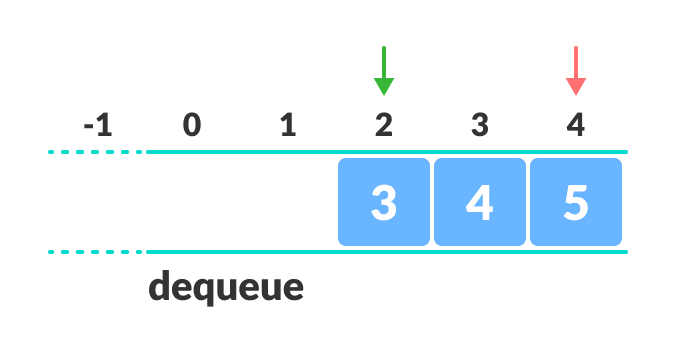
And we can only add indexes 0 and 1 only when the queue is reset (when all the elements have been dequeued).
After REAR reaches the last index, if we can store extra elements in the empty spaces (0 and 1), we can make use of the empty spaces. This is implemented by a modified queue called the circular queue.
Complexity Analysis
The complexity of enqueue and dequeue operations in a queue using an array is O(1). If you use pop(N) in python code, then the complexity might be O(n) depending on the position of the item to be popped.
Applications of Queue
- CPU scheduling, Disk Scheduling
- When data is transferred asynchronously between two processes.The queue is used for synchronization. For example: IO Buffers, pipes, file IO, etc
- Handling of interrupts in real-time systems.
- Call Center phone systems use Queues to hold people calling them in order.
Recommended Readings
Stack Data Structure
A stack is a linear data structure that follows the principle of Last In First Out (LIFO). This means the last element inserted inside the stack is removed first.
You can think of the stack data structure as the pile of plates on top of another.

Here, you can:
- Put a new plate on top
- Remove the top plate
And, if you want the plate at the bottom, you must first remove all the plates on top. This is exactly how the stack data structure works.
LIFO Principle of Stack
In programming terms, putting an item on top of the stack is called push and removing an item is called pop.
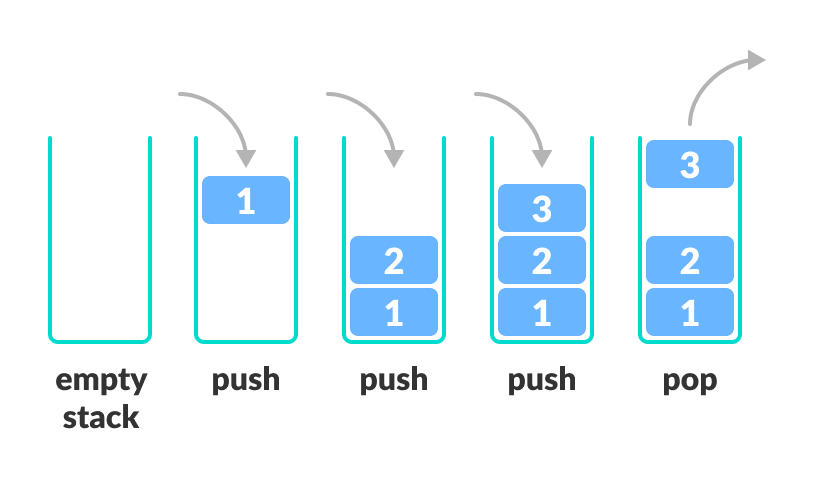
In the above image, although item 3 was kept last, it was removed first. This is exactly how the LIFO (Last In First Out) Principle works.
We can implement a stack in any programming language like C, C++, Java, Python or C#, but the specification is pretty much the same.
Basic Operations of Stack
There are some basic operations that allow us to perform different actions on a stack.
- Push: Add an element to the top of a stack
- Pop: Remove an element from the top of a stack
- IsEmpty: Check if the stack is empty
- IsFull: Check if the stack is full
- Peek: Get the value of the top element without removing it
Working of Stack Data Structure
The operations work as follows:
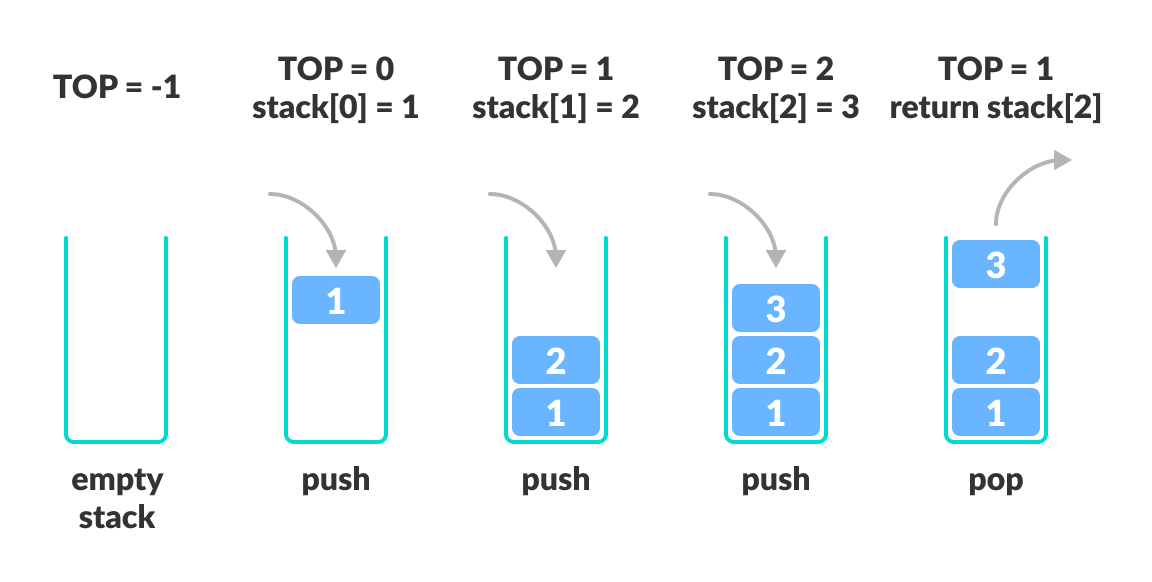
- A pointer called TOP is used to keep track of the top element in the stack.
- When initializing the stack, we set its value to -1 so that we can check if the stack is empty by comparing
TOP == -1. - On pushing an element, we increase the value of TOP and place the new element in the position pointed to by TOP.
- On popping an element, we return the element pointed to by TOP and reduce its value.
- Before pushing, we check if the stack is already full
- Before popping, we check if the stack is already empty
Stack Implementations in Python, Java, C, and C++
Stack Visualization: Don't just read about stack, watch it happen live. See how each line of the data structure works step-by-step with our new DSA visualizer. Try it yourself!
The most common stack implementation is using arrays, but it can also be implemented using lists.
# Stack implementation in python


# Creating a stack
def create_stack():
    stack = []
    return stack


# Creating an empty stack
def check_empty(stack):
    return len(stack) == 0


# Adding items into the stack
def push(stack, item):
    stack.append(item)
    print("pushed item: " + item)


# Removing an element from the stack
def pop(stack):
    if (check_empty(stack)):
        return "stack is empty"

    return stack.pop()


stack = create_stack()
push(stack, str(1))
push(stack, str(2))
push(stack, str(3))
push(stack, str(4))
print("popped item: " + pop(stack))
print("stack after popping an element: " + str(stack))
// Stack implementation in Java

class Stack {
  private int arr[];
  private int top;
  private int capacity;

  // Creating a stack
  Stack(int size) {
    arr = new int[size];
    capacity = size;
    top = -1;
  }

  // Add elements into stack
  public void push(int x) {
    if (isFull()) {
      System.out.println("OverFlow\nProgram Terminated\n");
      System.exit(1);
    }

    System.out.println("Inserting " + x);
    arr[++top] = x;
  }

  // Remove element from stack
  public int pop() {
    if (isEmpty()) {
      System.out.println("STACK EMPTY");
      System.exit(1);
    }
    return arr[top--];
  }

  // Utility function to return the size of the stack
  public int size() {
    return top + 1;
  }

  // Check if the stack is empty
  public Boolean isEmpty() {
    return top == -1;
  }

  // Check if the stack is full
  public Boolean isFull() {
    return top == capacity - 1;
  }

  public void printStack() {
    for (int i = 0; i <= top; i++) {
      System.out.println(arr[i]);
    }
  }

  public static void main(String[] args) {
    Stack stack = new Stack(5);

    stack.push(1);
    stack.push(2);
    stack.push(3);
    stack.push(4);

    stack.pop();
    System.out.println("\nAfter popping out");

    stack.printStack();

  }
}
// Stack implementation in C

#include <stdio.h>
#include <stdlib.h>

#define MAX 10

int count = 0;

// Creating a stack
struct stack {
  int items[MAX];
  int top;
};
typedef struct stack st;

void createEmptyStack(st *s) {
  s->top = -1;
}

// Check if the stack is full
int isfull(st *s) {
  if (s->top == MAX - 1)
    return 1;
  else
    return 0;
}

// Check if the stack is empty
int isempty(st *s) {
  if (s->top == -1)
    return 1;
  else
    return 0;
}

// Add elements into stack
void push(st *s, int newitem) {
  if (isfull(s)) {
    printf("STACK FULL");
  } else {
    s->top++;
    s->items[s->top] = newitem;
  }
  count++;
}

// Remove element from stack
void pop(st *s) {
  if (isempty(s)) {
    printf("\n STACK EMPTY \n");
  } else {
    printf("Item popped= %d", s->items[s->top]);
    s->top--;
  }
  count--;
  printf("\n");
}

// Print elements of stack
void printStack(st *s) {
  printf("Stack: ");
  for (int i = 0; i < count; i++) {
    printf("%d ", s->items[i]);
  }
  printf("\n");
}

// Driver code
int main() {
  int ch;
  st *s = (st *)malloc(sizeof(st));

  createEmptyStack(s);

  push(s, 1);
  push(s, 2);
  push(s, 3);
  push(s, 4);

  printStack(s);

  pop(s);

  printf("\nAfter popping out\n");
  printStack(s);
}
// Stack implementation in C++

#include <stdlib.h>
#include <iostream>

using namespace std;

#define MAX 10
int size = 0;

// Creating a stack
struct stack {
  int items[MAX];
  int top;
};
typedef struct stack st;

void createEmptyStack(st *s) {
  s->top = -1;
}

// Check if the stack is full
int isfull(st *s) {
  if (s->top == MAX - 1)
    return 1;
  else
    return 0;
}

// Check if the stack is empty
int isempty(st *s) {
  if (s->top == -1)
    return 1;
  else
    return 0;
}

// Add elements into stack
void push(st *s, int newitem) {
  if (isfull(s)) {
    cout << "STACK FULL";
  } else {
    s->top++;
    s->items[s->top] = newitem;
  }
  size++;
}

// Remove element from stack
void pop(st *s) {
  if (isempty(s)) {
    cout << "\n STACK EMPTY \n";
  } else {
    cout << "Item popped= " << s->items[s->top];
    s->top--;
  }
  size--;
  cout << endl;
}

// Print elements of stack
void printStack(st *s) {
  printf("Stack: ");
  for (int i = 0; i < size; i++) {
    cout << s->items[i] << " ";
  }
  cout << endl;
}

// Driver code
int main() {
  int ch;
  st *s = (st *)malloc(sizeof(st));

  createEmptyStack(s);

  push(s, 1);
  push(s, 2);
  push(s, 3);
  push(s, 4);

  printStack(s);

  pop(s);

  cout << "\nAfter popping out\n";
  printStack(s);
}
Stack Time Complexity
For the array-based implementation of a stack, the push and pop operations take constant time, i.e. O(1).
Applications of Stack Data Structure
Although stack is a simple data structure to implement, it is very powerful. The most common uses of a stack are:
- To reverse a word - Put all the letters in a stack and pop them out. Because of the LIFO order of stack, you will get the letters in reverse order.
- In compilers - Compilers use the stack to calculate the value of expressions like
2 + 4 / 5 * (7 - 9)by converting the expression to prefix or postfix form. - In browsers - The back button in a browser saves all the URLs you have visited previously in a stack. Each time you visit a new page, it is added on top of the stack. When you press the back button, the current URL is removed from the stack, and the previous URL is accessed.