


In computer programming, the if statement is a conditional statement. It is used to execute a block of code only when a specific condition is met. For example,
Suppose we need to assign different grades to students based on their scores.
- If a student scores above 90, assign grade A
- If a student scores above 75, assign grade B
- If a student scores above 65, assign grade C
These conditional tasks can be achieved using the if statement.
Python if Statement
An if statement executes a block of code only if the specified condition is met.
Syntax
if condition:
    # body of if statement
Here, if the condition of the if statement is:
- True - the body of the
ifstatement executes. - False - the body of the
ifstatement is skipped from execution.
Let's look at an example.
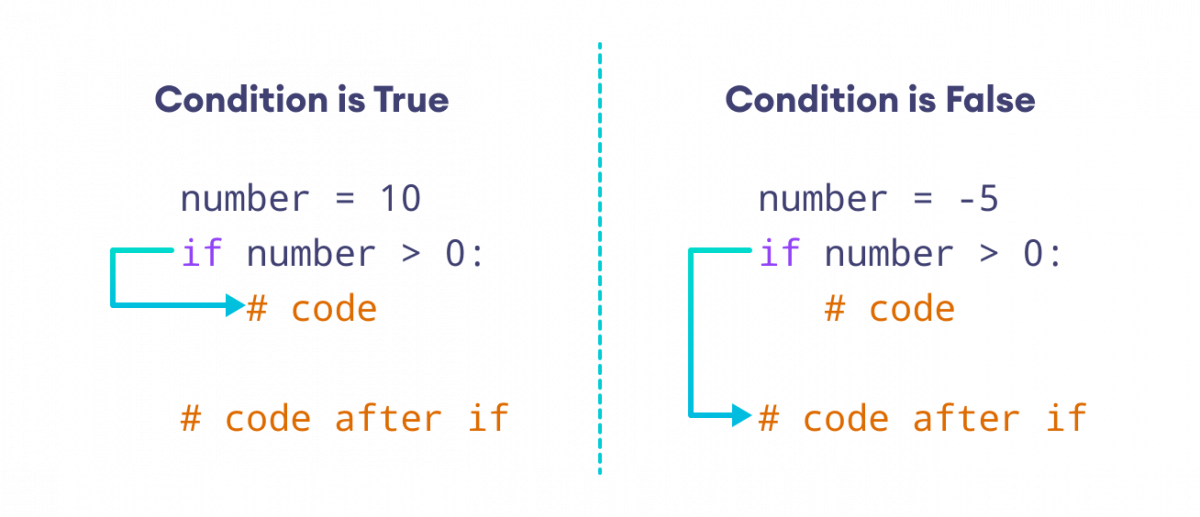
Note: Be mindful of the indentation while writing the if statements. Indentation is the whitespace at the beginning of the code.
if number > 0:
    print('Number is positive')
Here, the spaces before the print() statement denote that it's the body of the if statement.
Example: Python if Statement
number = 10

# check if number is greater than 0
if number > 0:
    print('Number is positive')

print('This statement always executes')
Sample Output 1
Number is positive
This statement always executes
In the above example, we have created a variable named number. Notice the test condition,
number > 0
As the number is greater than 0, the condition evaluates True. Hence, the body of the if statement executes.
Sample Output 2
Now, let's change the value of the number to a negative integer, say -5.
number = -5
Now, when we run the program, the output will be:
This statement always executes
This is because the value of the number is less than 0. Hence, the condition evaluates to False. And, the body of the if statement is skipped.
Python if...else Statement
An if statement can have an optional else clause. The else statement executes if the condition in the if statement evaluates to False.
Syntax
if condition:
    # body of if statement

else:
    # body of else statement
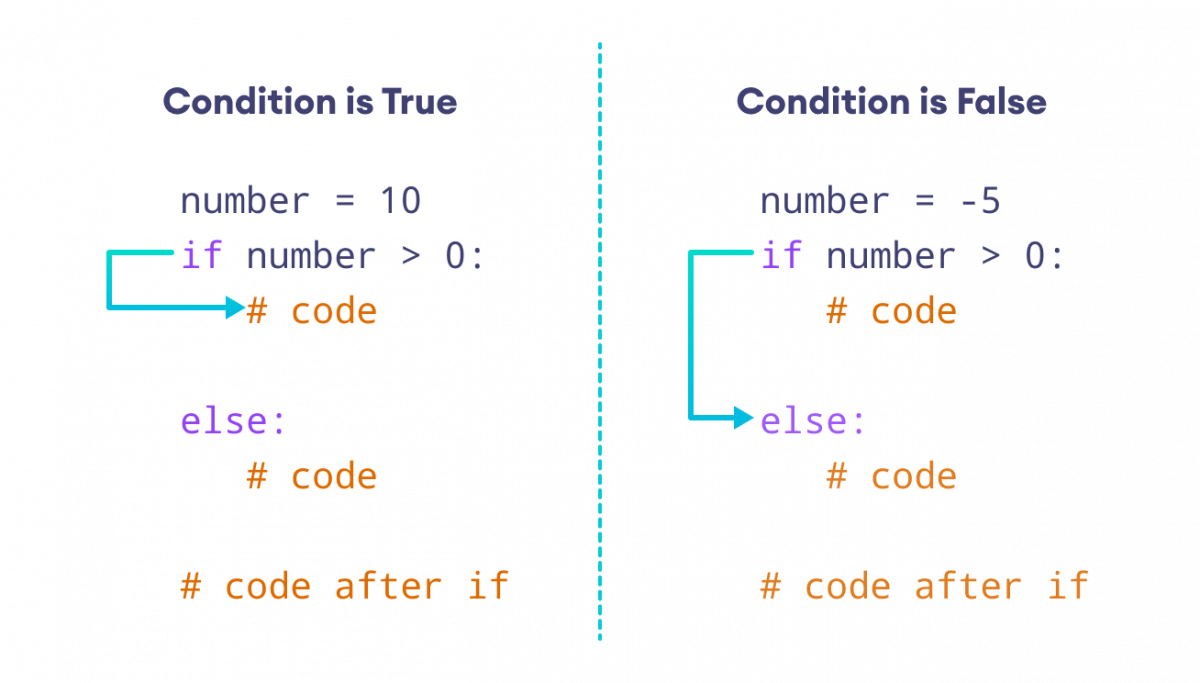
Here, if the condition inside the if statement evaluates to
- True - the body of
ifexecutes, and the body ofelseis skipped. - False - the body of
elseexecutes, and the body ofifis skipped
Let's look at an example.
Example: Python if…else Statement
number = 10

if number > 0:
    print('Positive number')

else:
    print('Negative number')

print('This statement always executes')
Sample Output 1
Positive number
This statement always executes
In the above example, we have created a variable named number.
Since the value of the number is 10, the condition evaluates to True. Hence, code inside the body of if is executed.
Sample Output 2
If we change the value of the variable to a negative integer, let's say -5, our output will be:
Negative number
This statement always executes
Here, the test condition evaluates to False. Hence code inside the body of else is executed.
Python if…elif…else Statement
The if...else statement is used to execute a block of code among two alternatives.
However, if we need to make a choice between more than two alternatives, we use the if...elif...else statement.
Syntax
if condition1:
    # code block 1

elif condition2:
    # code block 2

else:
    # code block 3
Here,
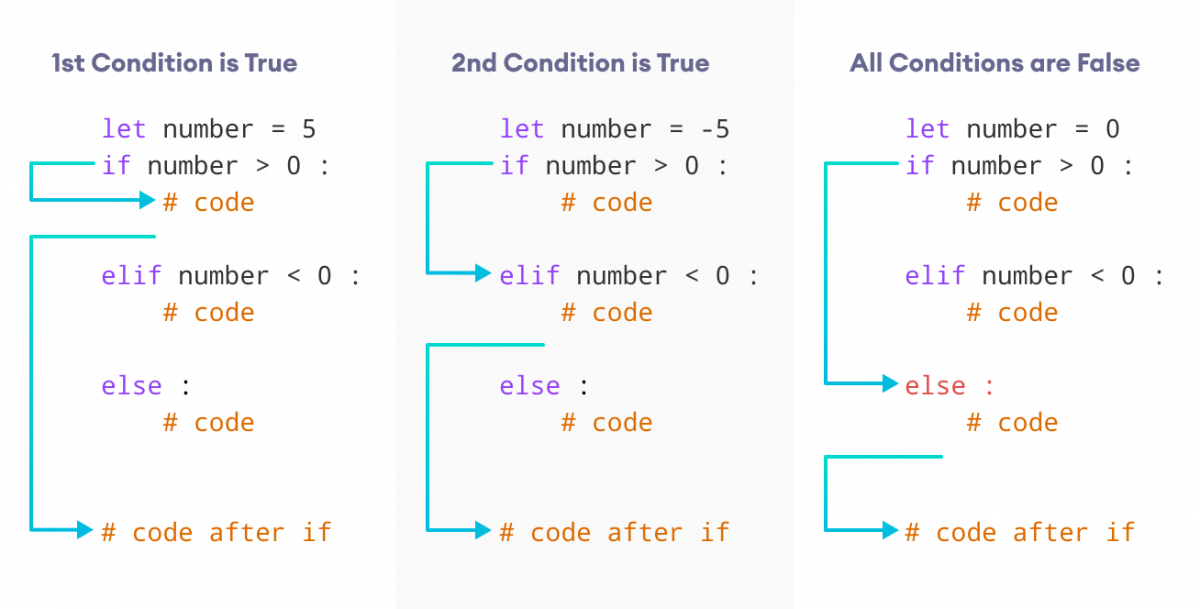
if condition1- This checks ifcondition1isTrue. If it is, the program executes code block 1.
elif condition2- Ifcondition1is notTrue, the program checkscondition2. Ifcondition2isTrue, it executes code block 2.
else- If neithercondition1norcondition2isTrue, the program defaults to executing code block 3.
Let's look at an example.
Example: Python if…elif…else Statement
number = 0

if number > 0:
    print('Positive number')

elif number <0:
    print('Negative number')

else:
    print('Zero')

print('This statement is always executed')
Output
Zero
This statement is always executed
In the above example, we have created a variable named number.
Since the value of the number is 0, both the test conditions evaluate to False.
Hence, the statement inside the body of else is executed.
Python Nested if Statements
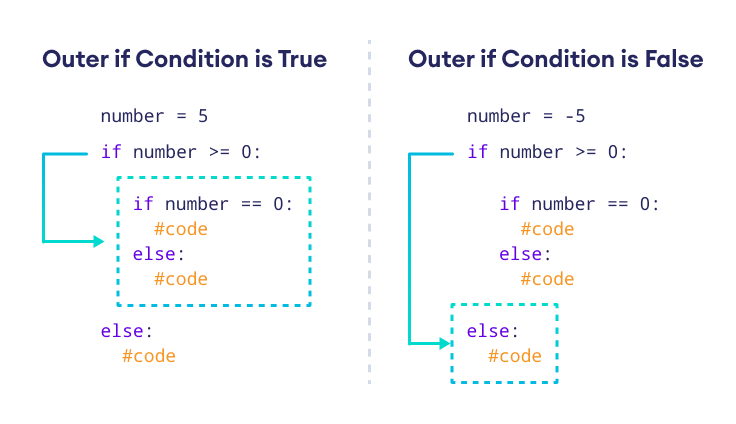
It is possible to include an if statement inside another if statement. For example,
number = 5

# outer if statement
if number >= 0:
    # inner if statement
    if number == 0:
      print('Number is 0')

    # inner else statement
    else:
        print('Number is positive')

# outer else statement
else:
    print('Number is negative')
Output
Number is positive
Here's how this program works.
More on Python if…else Statement
if Shorthand
In certain situations, the if statement can be simplified into a single line. For example,
number = 10

if number > 0:
    print('Positive')
This code can be compactly written as
number = 10

if number>0: print('Positive')
This one-liner approach retains the same functionality but in a more concise format.
if...else
Python doesn't have a ternary operator. However, we can use if...else to work like a ternary operator in other languages. For example,
grade = 40

if grade >= 50:
    result = 'pass'
else:
    result = 'fail'

print(result)
can be written as
grade = 40

result = 'pass' if number >= 50 else 'fail'

print(result)
We can use logical operators such as and and or within an if statement.
age = 35
salary = 6000

# add two conditions using and operator
if age >= 30 and salary >= 5000:
    print('Eligible for the premium membership.')
else:
    print('Not eligible for the premium membership')
Output
Eligible for the premium membership.
Here, we used the logical operator and to add two conditions in the if statement.
We also used >= (comparison operator) to compare two values.
Logical and comparison operators are often used with if...else statements. Visit Python Operators to learn more.